A lightning strike three blocks away can fry your $2,000 OLED TV in milliseconds. So can a utility company switching error or even your neighbor’s AC compressor cycling on. Most homeowners plug their home theater components into whatever power strip is handy, not realizing that a $15 basic strip offers zero protection against voltage spikes. A dedicated home theater surge protector isn’t optional, it’s essential insurance for equipment that costs thousands. This guide covers what separates real surge protection from false security and how to choose the right unit for your setup.
Table of Contents
ToggleKey Takeaways
- A home theater surge protector is essential insurance for expensive equipment because basic power strips lack the metal oxide varistors (MOVs) needed to stop voltage spikes in microseconds.
- Choose a surge protector with at least 1,500 joules capacity and a clamping voltage of 400V or lower to protect sensitive microprocessors from both lightning and everyday surges caused by HVAC systems and grid switching.
- Include auxiliary line protection for coaxial cables, Ethernet, and phone lines in your home theater surge protector setup, as surges often enter through these connections rather than just power lines.
- Install your surge protector directly into a grounded wall outlet (never in an extension cord), position it for proper ventilation, and replace it every 3-5 years since MOVs degrade over time regardless of visible protection indicators.
- Layer your protection with a whole-house surge protector at the main electrical panel plus a point-of-use unit at your entertainment center for comprehensive defense against voltage spikes from both external utilities and internal connections.
Why Your Home Theater System Needs a Surge Protector
Home theater gear is uniquely vulnerable. Modern TVs, AV receivers, gaming consoles, and streaming devices contain sensitive microprocessors that can’t handle voltage fluctuations the way an old incandescent bulb could. A surge, defined as any voltage spike above 120V, can come from lightning, but more often it comes from everyday events: the power grid switching loads, HVAC systems kicking on, or even faulty wiring in your own home.
Direct lightning strikes are rare, but they happen. Insurance claims show that lightning-related surge damage costs homeowners an average of $4,800 per incident, and most policies have deductibles that make small claims impractical. More common are the slow killers: micro-surges that degrade components over months until your receiver starts glitching or your TV develops dead pixels.
A basic power strip does not protect against surges. If it doesn’t list a joule rating on the package, it’s just an extension cord with a circuit breaker. That breaker trips at sustained overload (like plugging in too many devices), but it reacts far too slowly to stop a voltage spike that lasts microseconds. Real surge protectors use metal oxide varistors (MOVs) that divert excess voltage to ground almost instantly.
There’s also the issue of phantom power and always-on devices. Your streaming box, soundbar, and cable modem stay energized 24/7, which means they’re exposed to surges around the clock. According to testing by protection experts, most surge events happen during non-storm conditions, so unplugging during thunderstorms isn’t enough.
Finally, interconnected systems face a special risk called ground loop surges. When your TV, receiver, cable box, and streaming device all connect via HDMI, a surge entering through the coax cable line can travel through those HDMI connections and damage multiple components. A quality home theater surge protector includes coaxial and Ethernet line protection to block surges coming from any connection point.
Key Features to Look for in a Home Theater Surge Protector
Not all surge protectors are built the same. The cheap ones at checkout counters might protect a lamp, but home theater systems demand higher-grade equipment. Here’s what actually matters.
Joule Rating and Clamping Voltage
Joule rating measures how much energy the surge protector can absorb before it fails. Think of it as a sponge, once it’s saturated, it’s done. For home theater use, look for a minimum of 1,500 joules. Quality units range from 2,000 to 4,000 joules. Higher is better, but also consider that joules get depleted with every surge, not just catastrophic ones. Small surges chip away at the rating over years.
Clamping voltage (or let-through voltage) is the threshold at which the MOVs activate. It’s listed in the UL 1449 rating, typically as 330V, 400V, or 500V. Lower is better because it means less excess voltage reaches your equipment. For sensitive electronics, choose 400V or lower. A unit rated at 500V lets through voltage that can still damage modern circuitry.
Response time also matters, though it’s rarely advertised. Quality MOVs react in less than one nanosecond. Avoid units that don’t specify UL 1449 certification, it means they haven’t been independently tested.
Number and Type of Outlets
Count your devices, then add two. Home theater setups expand over time. Most quality units offer 8 to 12 outlets, but configuration matters as much as quantity.
Look for widely spaced outlets that accommodate bulky wall warts without blocking adjacent sockets. Some models rotate outlets or separate them into banks. Rotating outlets are useful for transformer plugs that stick out sideways.
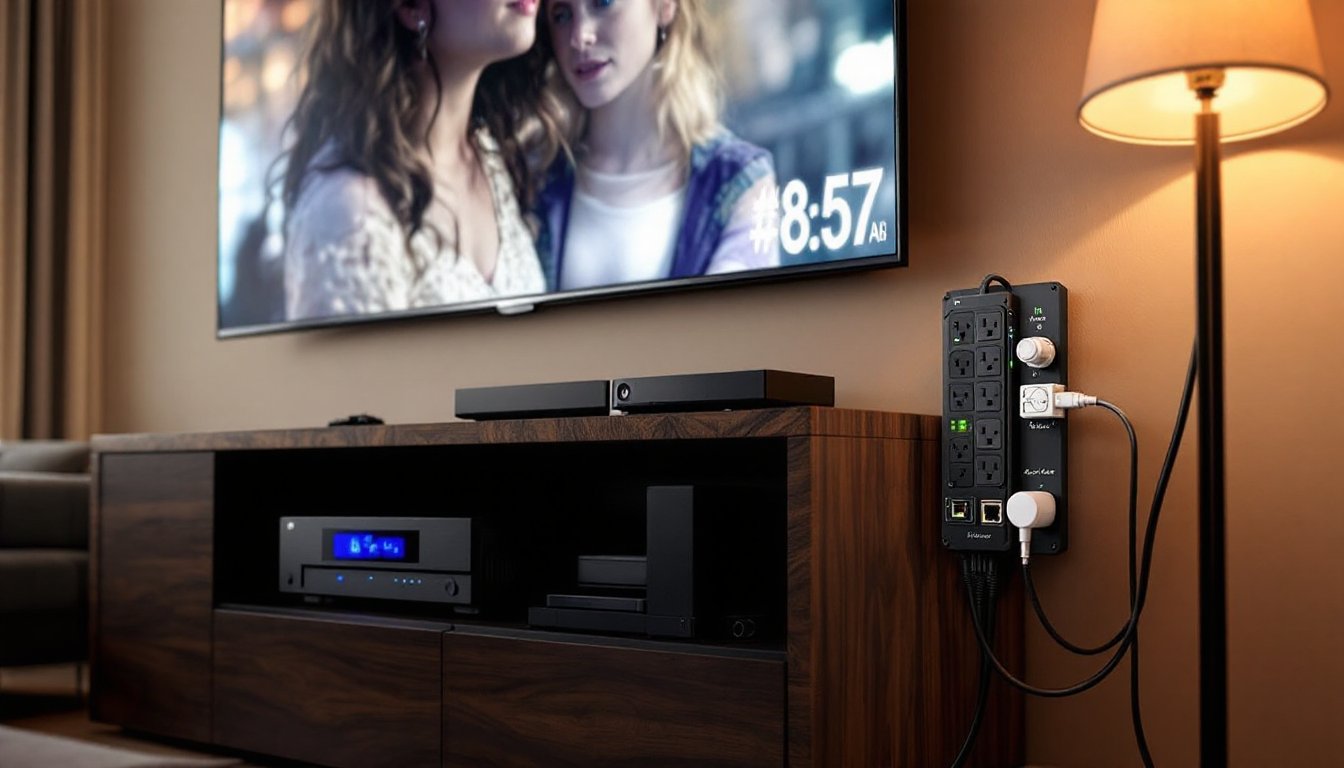
You also need auxiliary line protection. Surges don’t just come through AC power, they enter via coaxial cable lines (from antenna or cable TV), Ethernet (from modems/routers), and even phone lines. A proper home theater surge protector includes:
- Coaxial (F-type) inputs/outputs for cable/satellite
- RJ45 Ethernet jacks for network-connected devices
- RJ11 phone line protection if you still have a landline
These auxiliary connections must pass through the surge protector to be protected. Simply plugging your TV’s power cord into the surge protector while the coax cable connects directly to the wall leaves a wide-open door for surges.
Other useful features include USB charging ports (though these don’t need surge protection themselves, having them is convenient), diagnostic LEDs that indicate protection status and proper grounding, and automatic shutdown that cuts power if protection fails. Some units include EMI/RFI noise filtering, which reduces electromagnetic and radio frequency interference that can cause picture or sound quality issues, especially relevant if you live near radio towers or have older wiring.
Best Types of Surge Protectors for Home Theater Setups
Three main categories exist, each suited to different installation needs and budgets.
Plug-in surge protector strips are the most common. They plug into an existing outlet and offer 6-12 protected outlets plus auxiliary line protection. Expect to spend $40-$80 for a quality unit with 2,000+ joules and proper certifications. These work fine for rentals or if you can’t modify wiring. Mount them off the floor using keyhole slots on the back, carpet fibers and dust reduce cooling and increase fire risk.
Rack-mounted surge protectors integrate into AV equipment racks. If you have a receiver, power amplifier, and other rack-mountable gear, these units (typically 1U or 2U rack space) provide clean power distribution and surge protection in one package. They often include sequenced power-up to prevent inrush current from tripping breakers when you power on multiple components simultaneously. Pricing runs $80-$200 depending on features. They’re overkill for a basic TV-and-soundbar setup but ideal for dedicated home theater rooms.
Whole-house surge protectors install at your main electrical panel. A licensed electrician connects them to your 200-amp service panel, where they intercept surges before they enter your home’s wiring. These units handle much larger joule ratings (40,000-80,000 joules) and protect everything plugged in anywhere in the house. Cost runs $300-$500 installed.
Whole-house protection is the gold standard, but it’s not a complete solution for home theaters. It stops surges from the utility line but won’t protect against surges entering through coax or Ethernet. Best practice is layered protection: whole-house suppression at the panel plus a point-of-use surge protector at the entertainment center for auxiliary line protection and finer clamping voltage.
Battery backup units (UPS systems) combine surge protection with an internal battery that keeps equipment running during brief outages. They’re useful if you experience frequent brownouts or want to gracefully shut down a media server during power loss. But, most home theater components don’t need uninterrupted power, a TV going dark for 10 seconds during a storm isn’t a crisis. UPS units cost $120-$300 and the batteries need replacement every 3-5 years. Unless you have specific needs (like protecting a NAS or HTPC with active recordings), a standard surge protector is more cost-effective.
How to Properly Install and Position Your Surge Protector
Installation mistakes undermine even the best surge protector. Follow these steps to ensure full protection.
1. Verify proper grounding. Surge protectors rely on the ground wire to divert excess voltage. If your outlet isn’t grounded (common in older homes with two-prong outlets), the surge protector won’t work. Use a three-light outlet tester ($5 at any hardware store) to confirm correct wiring before installation. If the outlet shows open ground, hire an electrician, this isn’t a DIY fix for amateurs.
2. Plug directly into the wall outlet. Never daisy-chain surge protectors or plug one into an extension cord. This creates resistance that slows response time and can cause overheating. If the outlet is too far from your equipment, move the outlet (requires running new wire in-wall) or reposition your setup. Home improvement experts at Family Handyman note that extension cords and power strips are a leading cause of residential electrical fires when overloaded.
3. Connect all auxiliary lines. Run your coaxial cable from the wall jack into the surge protector’s “IN” port, then from the “OUT” port to your TV or cable box. Same for Ethernet: modem to surge protector IN, surge protector OUT to router or smart TV. Leaving these direct-wired bypasses your protection.
4. Position for ventilation. Surge protectors generate heat, especially under load. Mount them on a wall using the integrated keyholes, or place them on a hard surface with at least two inches of clearance on all sides. Don’t bury them behind furniture, under rugs, or inside enclosed cabinets. Overheating degrades MOVs faster.
5. Label and date it. Write the installation date on a piece of tape stuck to the unit. Surge protectors don’t last forever, plan to replace them every 3-5 years even if they haven’t experienced a major surge. The MOVs degrade over time from small, unnoticed events.
6. Check indicator lights regularly. Most units have a “protected” LED. If it goes out, the MOVs have failed and the unit is now just a power strip. Replace it immediately. Some models include an audible alarm for added warning.
Common Mistakes to Avoid When Using Home Theater Surge Protection
Even with the right equipment, improper use leaves you vulnerable. Here are the most frequent errors.
Trusting the “protected” light indefinitely. MOVs sacrifice themselves to protect your gear, they wear out. A surge protector that’s been in use for a decade has likely lost most of its capacity even if the light still glows. Some cheaper models don’t disconnect when protection fails: they keep passing power with zero surge suppression. Replace surge protectors every few years as a matter of routine maintenance.
Ignoring outlet load capacity. Surge protectors have a maximum amperage rating, typically 15 amps. While you’re unlikely to overload one with typical home theater gear (a 65-inch OLED draws about 1.5 amps, a receiver maybe 3 amps), adding space heaters or other high-draw devices can trip the breaker or cause overheating. Keep total load under 80% of rated capacity for safety margin.
Using a surge protector as a substitute for proper wiring. If your home has frequent surges, flickering lights, or outlets that spark, the problem is your electrical system, not a lack of surge protection. Technology reviewers at Tom’s Guide emphasize that older homes with aluminum wiring or insufficient grounding need professional electrical upgrades. A surge protector is a Band-Aid on a bigger issue.
Skipping coax and Ethernet protection. The most common entry point for surges in modern homes is the cable TV line, not the power line. Lightning can strike an aerial cable span blocks away and send a surge through the coax into your equipment. Always use the auxiliary protection inputs.
Assuming all outlets on the strip are equal. Some budget models only surge-protect half their outlets, the rest are unswitched pass-throughs for convenience. Read the specs. Plug critical equipment (TV, receiver, gaming console) into the protected outlets: use pass-through outlets only for low-value accessories like LED bias lighting.
Plugging in laser printers or power tools. These create their own voltage spikes when they cycle on and can degrade the surge protector’s components. Keep them on separate circuits.
Finally, don’t assume your equipment has built-in protection. While some high-end receivers include basic surge suppression, it’s minimal, usually just enough to meet safety certifications. Relying on it is like wearing a bicycle helmet instead of a seatbelt in a car. Use dedicated protection.